Charts to express logic and their evolution
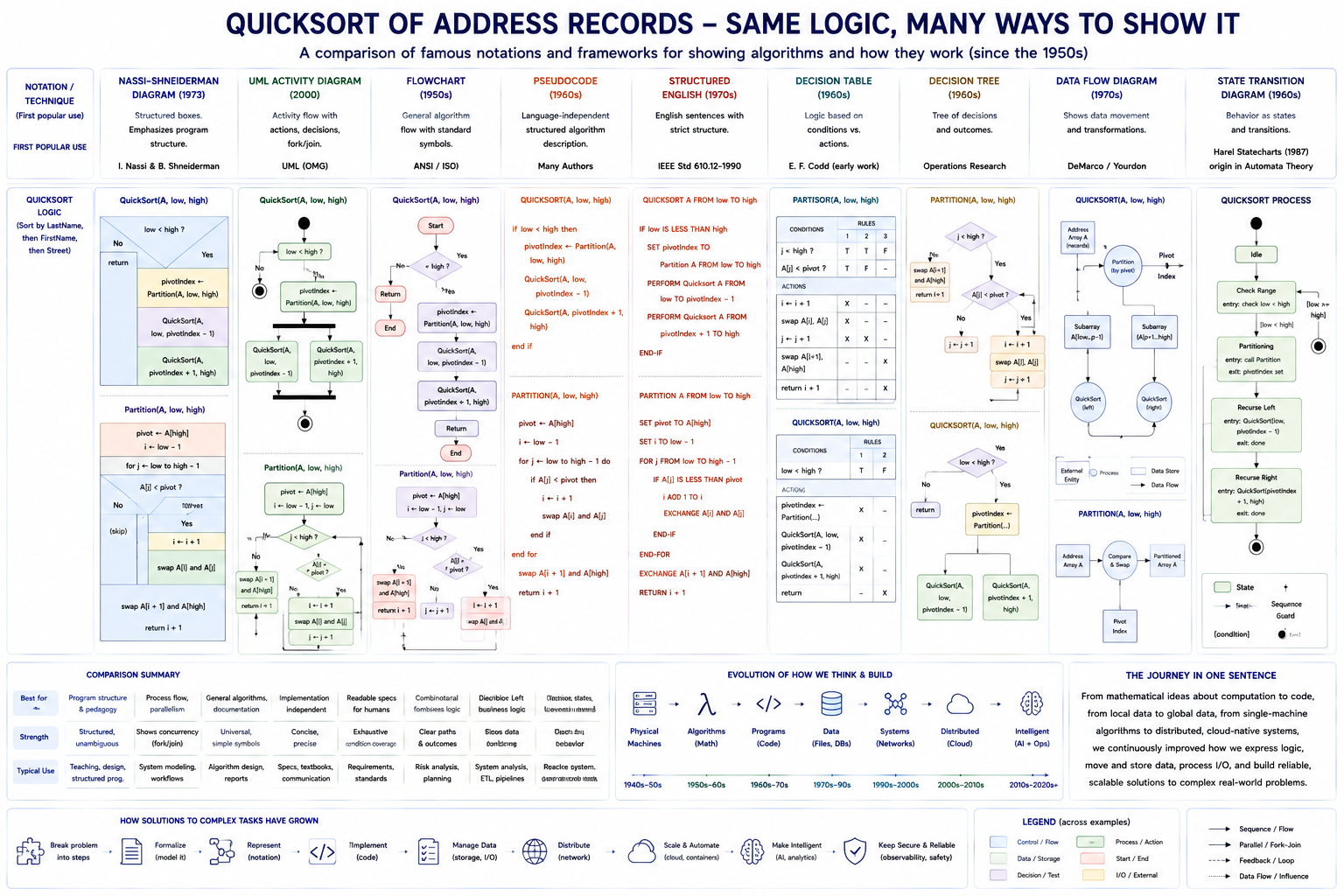
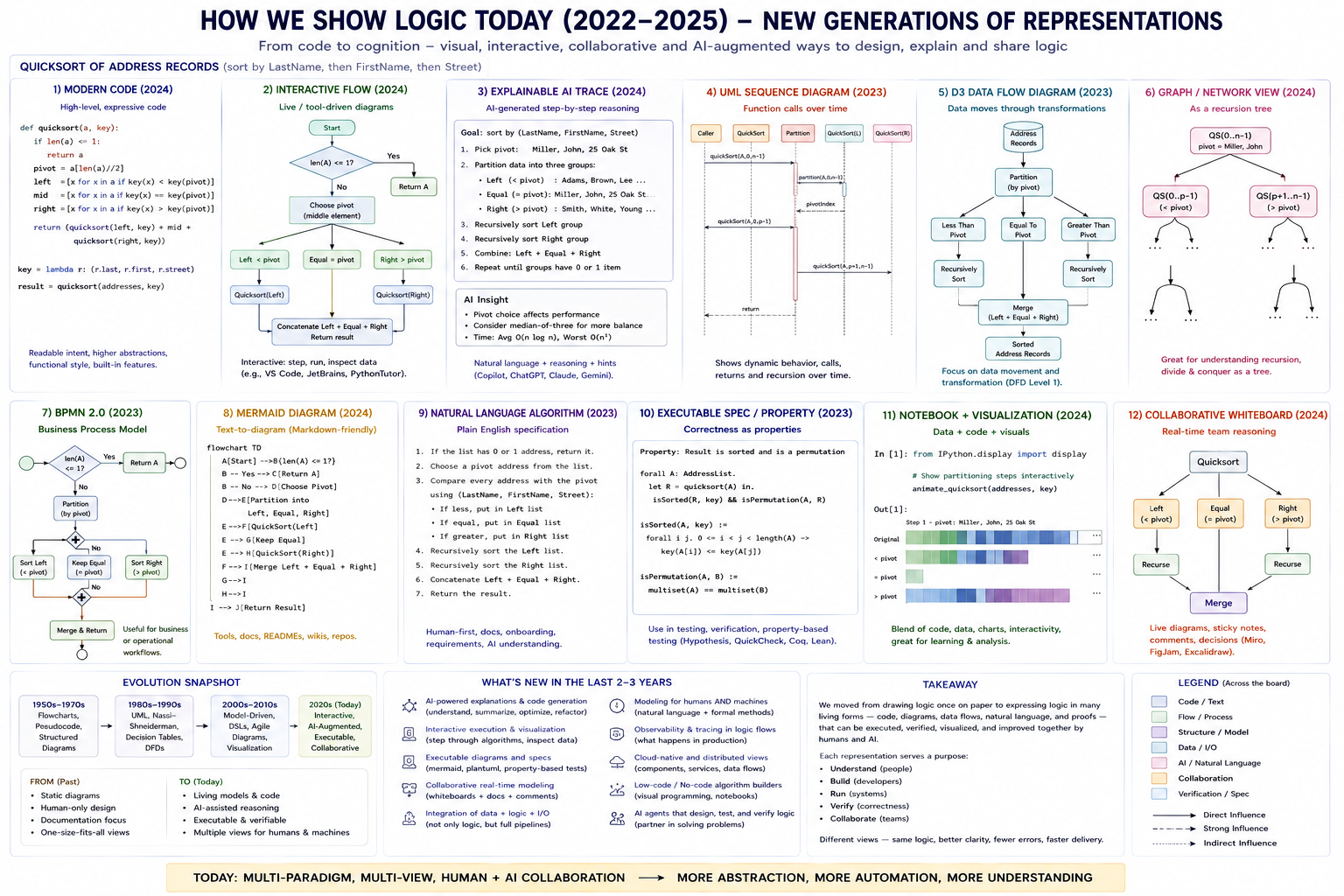
The way to express the logic of routines and procedures has changed over the decades. The reason is that the foundation of expressions and theories in developing programs/logics is scientific and mathematical. This explains why, at the beginning, ways to show logic were very close to how mathematical functions and expressions are defined. As programming paradigms changed and evolved, flowcharts and similar tools became insufficient. For this reason, ways of expressing logic have changed over time. The more complex the systems and paradigms, the more complex the description logic becomes. The goal is always to simplify these descriptions so each team member can understand them at the same level.
The history of charts to design and express logic
Now you may say, why should I learn these old things? It is just history. The point is that many applications and systems are described using these older ways of expressing logic. For that reason, a professional should be able at last to read these FlowCharts and PSEUDOCODE and all the other ways to express logic. Even nowadays, some applications are designed in that way; for example, assembler-written modules.
The ways to express logic in a timeline
Flowchart(1950s) - A flowchart is a way to show logic as a picture with the following figures:
Figures Table:Here is a table of figures and symbols used for a flowchart
| Symbol | Name | Meaning / Use |
|---|---|---|
| ⬭ | Terminator | Start or end of a program/process |
| ▭ | Process | An operation, calculation, assignment, or action |
| ◇ | Decision | Condition or question; branches typically into Yes/No or True/False |
| ▱ | Input/Output | Read input or produce/output data |
| → | Flow Line | Shows the direction of Control Flow |
| ○ | On-page connector | Connects two separated flow lines on the same page |
| ⬟ | Off-page connector | Flow continues on another page/diagram |
| ▭ with double vertical edges | Predefined process/Subroutine | Call to another procedure, function, or predefined process |
| ⬡ | Preparation | Initialization or preparation, e.g. i = 0 |
| D-shaped symbol | Delay | Waiting or delay in processing |
| Document shape (rectangle with wavy bottom) | Document | A document/report produced or consumed |
| Stacked documents | Multiple Documents | Several documents |
| Cylinder | Data sources (e.g.: Database(s)) | Persistent stored data, traditionally disk/database |
| Trapezoid | Manual Operation | An operation performed manually |
| Inverted Trapezoid | Manual input | Data entered manually, traditionally via keyboard |
| Hexagon-like display symbol | Display | Information shown on a display |
| Annotation/bracket | Comment/Annotation | Additional explanation associated with part of the flowchart |
A Simple program example
              ╭───────────╮
              │   START   │
              ╰─────┬─────╯
                    │
                    ▼
             ╱─────────────╲
            ╱    Read X     ╲       INPUT
            ╲               ╱
             ╲──────┬──────╱
                    │
                    ▼
              ┌───────────┐
              │  Y = X*2  │             PROCESS
              └─────┬─────┘
                    │
                    ▼
                 ╱─────╲
                ╱ Y > 10╲                 DECISION
                ╲       ╱
                 ╲──┬──╱
               Yes  │  No
          ┌─────────┴─────────┐
          ▼                   ▼
    ╱────────────╲       ╱────────────╲
   ╱ Print "big"  ╲     ╱Print "small" ╲
   ╲               ╱     ╲              ╱
    ╲──────┬──────╱       ╲──────┬─────╱
           │                     │
           └──────────┬──────────┘
                      ▼
                ╭───────────╮
                │    END    │
                ╰───────────╯
An elaborated example
                         ╭────────────────────╮
                         │       START        │
                         ╰─────────┬──────────╯
                                   │
                                   ▼
                         ⬡ PREPARATION
                    Initialize order system
                    attempts = 0
                                   │
                                   ▼
                       ╱────────────────────╲
                      ╱   MANUAL INPUT       ╲
                     │ Enter customer number  │
                      ╲──────────────────────╱
                                   │
                                   ▼
                         ▱ INPUT / OUTPUT
                    Read customer record
                                   │
                                   ▼
                            ◇ DECISION
                       Customer exists?
                         /           \
                      YES             NO
                       │               │
                       │               ▼
                       │       ┌────────────────┐
                       │       │    PROCESS     │
                       │       │ Create customer│
                       │       └───────┬────────┘
                       │               │
                       └───────┬───────┘
                               │
                               ▼
                   ║────────────────────║
                   ║ PREDEFINED PROCESS ║
                   ║ CalculatePrice()   ║
                   ║────────────────────║
                               │
                               ▼
                         ◇ DECISION
                     Payment required?
                       /          \
                     YES           NO
                      │             │
                      ▼             │
               ▱ INPUT / OUTPUT     │
                Request payment     │
                      │             │
                      ▼             │
                 D-SHAPE            │
                   DELAY             │
             Wait for payment       │
                      │             │
                      ▼             │
                 ◇ DECISION         │
              Payment received?     │
                /        \           │
              YES        NO          │
               │          │          │
               │          ▼          │
               │    ○ CONNECTOR A    │
               │          │          │
               └────┬─────┘          │
                    │                │
                    └────────┬───────┘
                             │
                             ▼
                       ┌───────────┐
                       │  PROCESS  │
                       │ Save order│
                       └─────┬─────┘
                             │
                             ▼
                          CYLINDER
                       ╭─────────────╮
                       │  DATABASE   │
                       │ Store order │
                       ╰──────┬──────╯
                              │
                              ▼
                    DOCUMENT SYMBOL
                       ┌─────────────┐
                       │   Invoice   │
                       └~~~~~~~~~~~~~┘
                              │
                              ▼
                MULTIPLE DOCUMENTS
                     ┌──────────────┐
                    ┌──────────────┐~
                   │ Invoice      │~~
                   │ Delivery note│~
                   └~~~~~~~~~~~~~~┘
                              │
                              ▼
                     MANUAL OPERATION
                        ╱───────────╲
                       │ Employee   │
                       │ packs goods│
                        ╲───────────╱
                              │
                              ▼
                       DISPLAY SYMBOL
                      ╭───────────────╮
                     / "Order ready"  │
                    ╰─────────────────╯
                              │
                              ├────────────── [ANNOTATION]
                              │               Order is now
                              │               ready to ship
                              ▼
                      ⬟ OFF-PAGE
                       CONNECTOR B
                   "Continue on page 2"


              ───────────── PAGE 2 ─────────────

                       ⬟ CONNECTOR B
                              │
                              ▼
                      ┌──────────────┐
                      │   PROCESS    │
                      │ Ship goods   │
                      └──────┬───────┘
                             │
                             ▼
                       ○ CONNECTOR C
                             │
                             ▼
                      ╭──────────────╮
                      │     END      │
                      ╰──────────────╯
One historical detail is worth noting: flowchart symbol sets vary somewhat between standards and eras.* The rectangle, diamond, parallelogram, terminator, and arrows are extremely stable, while symbols such as display, manual input, preparation, delay, and particular storage symbols are less commonly used in modern software flowcharts.
PSEUDOCODE(1960s) - Independent code, like in a computer language, to show the logic
Keywords table of PSEUDOCODE
| Command/Keyword | Purpose | Example |
|---|---|---|
| BEGIN | Start of block/program | BEGIN |
| END | End of block/program | END |
| SET/← | Assignment | SET x ← 10 |
| INPUT/READ | READ input | READ name |
| OUTPUT/PRINT | Produce output | PRINT message |
| IF | Conditional Execution | IF x > 10 THEN |
| THEN | True branch | THEN... |
| ELSE | Alternative branch | ELSE... |
| ELSE IF | Next if case | ELSE IF x = 10 THEN |
| END IF | End of if expression | END IF |
| CASE/SWITCH | Multiple branch expression/select | CASE command OF |
| WHEN | Selection Alternative | WHEN 1: ... |
| END CASE | End selection | END CASE |
| WHILE | The pre-condition Loop | WHILE x < 10 DO |
| END WHILE | End pre-cond loop | END WHILE |
| REPEAT | The start post-condition loop | Cell 3 |
| UNTIL | The post-condition end | UNTIL x = 10 |
| FOR | Counter loop | FOR i ← 1 TO 10 DO |
| TO | Counter is ascending | 1 TO 10 |
| DOWNTO | Counter is descending | 10 DOWNTO 1 |
| STEP | Change increment/decrement step value/default 1/-1 | STEP 2/-2 |
| END FOR | End for loop | END FOR |
| FOR EACH | Iterate through list | FOR EACH item IN list |
| BREAK | leave loop immediate | BREAK |
| CONTINUE | Iterate immediate | CONTINUE |
| FUNCTION | Define Function | FUNCTION max(a,b) |
| PROCEDURE | Define Procedure | PROCEDURE printString(s) |
| CALL | Call Procudure | CALL printString() |
| RETURN | return a value | RETURN value |
| DECLARE | declare a variable | DECLARE x AS INTEGER |
| ARRAY | declare an array | DECLARE values AS ARRAY |
| GOTO | jump without condition | GOTO retry |
| LABEL | JUMP label | LABEL retry |
| AND | logical AND | 3 < x AND y= 9 |
| OR | logical OR | 3 > t OR z >= 100 |
| NOT | logical negation | NOT finished |
| TRUE, FALSE | True/False - boolean constants | finished ← FALSE |
Examples using PSEUDOCODE
- Sequence
BEGIN
    READ x
    SET y ← x * 2
    PRINT y
END
- IF/THEN/ELSE
IF age >= 18 THEN
    PRINT "adult"
ELSE
    PRINT "minor"
END IF
- Here is a flowchart-like structure for comparison
             ◇
         age >= 18?
          /       \
       TRUE       FALSE
        ↓            ↓
 PRINT "adult"  PRINT "minor"
- WHILE
SET i ← 0

WHILE i < 10 DO
    PRINT i
    SET i ← i + 1
END WHILE
- REPEAT/UNTIL
REPEAT
    PRINT "Enter system password:"
    READ password
UNTIL password = correctPassword
- FOR
FOR i ← 1 TO 10 DO
    PRINT i
END FOR
- SWITCH/CASE
CASE command OF
    WHEN 1:
        PRINT "Open"
    WHEN 2:
        PRINT "Save"
    WHEN 3:
        PRINT "Exit"
    OTHERWISE:
        PRINT "Unknown command"
END CASE
- Functions
The definition
FUNCTION maximum(a, b)
    IF a > b THEN
        RETURN a
    ELSE
        RETURN b
    END IF
END FUNCTION
The invocation
largest ← maximum(x, y)
- Procedures
PROCEDURE printAddress(address)
    PRINT address.name
    PRINT address.street
    PRINT address.city
END PROCEDURE

CALL printAddress(customerAddress)
- A tiny program
BEGIN

    DECLARE numbers AS ARRAY
    DECLARE searchValue AS INTEGER
    DECLARE found AS BOOLEAN

    READ numbers
    READ searchValue

    SET found ← FALSE

    FOR EACH number IN numbers DO

        IF number = searchValue THEN
            SET found ← TRUE
            BREAK
        END IF

    END FOR

    IF found THEN
        PRINT "Value found"
    ELSE
        PRINT "Value not found"
    END IF

END
- A little minimalistic language core
BEGIN / END

READ
PRINT
SET

IF / THEN / ELSE / END IF

WHILE / DO / END WHILE
REPEAT / UNTIL
FOR / TO / STEP / END FOR

FUNCTION / PROCEDURE
CALL
RETURN

BREAK
CONTINUE
REMARK: With sequence + selection (IF) + iteration (WHILE), you already have the fundamental structured-programming control structures. FOR, CASE, REPEAT, etc. mainly make algorithms easier for humans to express and read.
Datatypes in PSEUDOCODE:
DATA TYPE DEFINITIONS
=====================

Primitive Data Types
--------------------

BOOLEAN
    Logical value.
    Values: TRUE, FALSE

CHARACTER
    A single character.
    Example: 'A'

STRING
    A sequence of characters.
    Example: "Hello World"

INTEGER
    Whole signed number.
    Examples: -100, 0, 42

NATURAL
    Non-negative whole number.
    Examples: 0, 1, 2, 100

REAL
    Real / floating-point number.
    Examples: 3.14, -0.25, 1.0

FLOAT
    Single-precision floating-point number.
    Example: 3.14159

DOUBLE
    Double-precision floating-point number.
    Example: 3.141592653589793

DECIMAL
    Decimal number with defined decimal precision.
    Often useful for financial calculations.
    Example: 123.45


Special Data Types
------------------

VOID
    Represents no value.
    Typically used as the return type of procedures.

NULL
    Represents the absence of a value.

ANY
    Represents a value of any supported type.


Collection / Compound Data Types
--------------------------------

ARRAY OF <TYPE>
    Fixed-size or indexed collection of elements
    having the same type.

    Example:
        DECLARE numbers AS ARRAY[10] OF INTEGER


LIST OF <TYPE>
    Ordered collection of elements.

    Example:
        DECLARE names AS LIST OF STRING


SET OF <TYPE>
    Unordered collection containing unique elements.

    Example:
        DECLARE numbers AS SET OF INTEGER


MAP OF <KEY_TYPE, VALUE_TYPE>
    Collection of key/value associations.

    Example:
        DECLARE ages AS MAP OF <STRING, INTEGER>


QUEUE OF <TYPE>
    First-In-First-Out collection.

    Example:
        DECLARE jobs AS QUEUE OF STRING


STACK OF <TYPE>
    Last-In-First-Out collection.

    Example:
        DECLARE values AS STACK OF INTEGER


RECORD / STRUCTURE
------------------

RECORD
    Compound data type containing named fields.

    Example:

        TYPE Address = RECORD
            name    AS STRING
            street  AS STRING
            city    AS STRING
            zipCode AS STRING
        END RECORD


ENUMERATION
-----------

ENUM
    Defines a finite set of named values.

    Example:

        TYPE Color = ENUM
            RED,
            GREEN,
            BLUE
        END ENUM


REFERENCE TYPES
---------------

REFERENCE TO <TYPE>
    Reference to another value or object.

    Example:
        DECLARE customer AS REFERENCE TO Customer


POINTER TO <TYPE>
    Explicit address/reference to another value.
    Mainly useful when pseudocode describes
    low-level algorithms.

    Example:
        DECLARE next AS POINTER TO Node


OPTIONAL TYPES
--------------

OPTIONAL <TYPE>
    Value can either contain a value of TYPE
    or contain no value.

    Example:
        DECLARE result AS OPTIONAL INTEGER


USER-DEFINED TYPES
------------------

TYPE <NAME> = <TYPE-DEFINITION>

    Creates a new named data type.

    Example:
        TYPE CustomerID = INTEGER


OBJECT / CLASS TYPES
--------------------

CLASS
    Structured data type containing state
    and operations.

    Example:

        CLASS Customer
            name    AS STRING
            address AS Address
        END CLASS


FUNCTION TYPES
--------------

FUNCTION(<PARAMETER_TYPES>) RETURNS <TYPE>

    Represents a callable function.

    Example:
        DECLARE compare AS
            FUNCTION(INTEGER, INTEGER) RETURNS BOOLEAN


Generic Types
-------------

<TYPE>
    Placeholder for another data type.

    Example:
        LIST OF <T>
        ARRAY OF <T>
        MAP OF <K, V>


Typical Variable Declaration
----------------------------

DECLARE <name> AS <type>

Examples:

    DECLARE counter AS INTEGER
    DECLARE price AS DECIMAL
    DECLARE average AS REAL
    DECLARE finished AS BOOLEAN
    DECLARE letter AS CHARACTER
    DECLARE name AS STRING
    DECLARE values AS ARRAY[100] OF INTEGER
    DECLARE names AS LIST OF STRING


Declaration with Initial Value
------------------------------

DECLARE <name> AS <type> ← <value>

Examples:

    DECLARE counter AS INTEGER ← 0
    DECLARE pi AS REAL ← 3.14159265
    DECLARE finished AS BOOLEAN ← FALSE
    DECLARE name AS STRING ← "John"


Constants
---------

CONSTANT <name> AS <type> ← <value>

Examples:

    CONSTANT MAX_SIZE AS INTEGER ← 1000
    CONSTANT PI AS REAL ← 3.14159265


Type Inference
--------------

DECLARE <name> ← <value>

The type is inferred from the initial value.

Examples:

    DECLARE counter ← 0
    DECLARE name ← "John"
    DECLARE finished ← FALSE
Here is the link to Backus/Naur form (BNF) for the PSEUDOCODE:
The language definition is shown here to prove that PSEUDOCODE has all necessary language elements
The Backus/Naur(BNF) Form for pseudocode
The project derived from this BNF
Pseudo Code Language Interpreter